You built a Plex library. Hundreds of movies, TV shows, maybe a music collection — all sitting on a drive at home. Then you try to open it from a hotel room or a friend's place and hit a wall: buffering, quality drops, or that frustrating message telling you the content isn't available outside your home network.
This article explains why that happens, what your real options are, and how to set up Plex remote access in a way that actually works — without routing your traffic through someone else's server or paying a monthly fee indefinitely.
Why Plex Remote Access Is Unreliable by Default
Plex has a built-in remote access feature. When it works, it's convenient. When it doesn't, you end up in a loop of port forwarding guides, firewall rules, and ISP restrictions that leads nowhere fast.
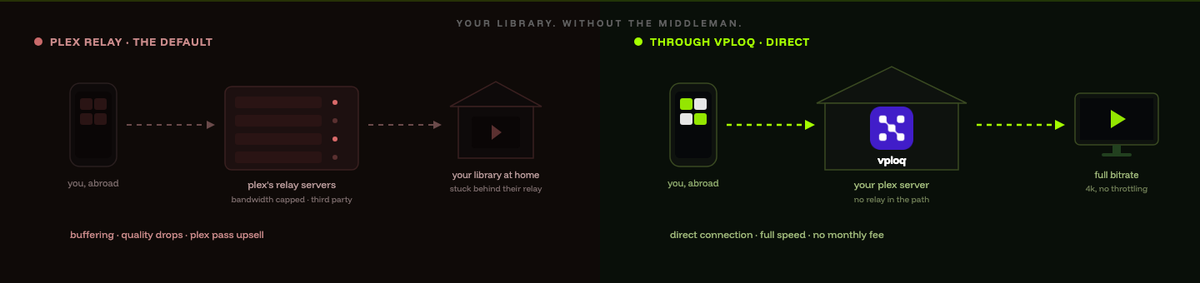
The root issue: Plex's default remote access falls back to Plex's own relay servers when a direct connection isn't possible. Plex calls this "indirect" mode. Your video data passes through Plex's infrastructure, which adds latency, caps bandwidth, and puts a third party between your server and your screen.
Direct connections require an open port on your home router and a reachable IP address. The problem is that most residential ISPs now use carrier-grade NAT (CGNAT), which means your home doesn't have a truly public IP at all. Port forwarding won't help. Plex falls back to its relay — or fails entirely.
Then there's Plex Pass. Some remote access features, including better relay quality and certain sync options, are locked behind a subscription at $4.99 per month or $119.99 for a lifetime license. You already paid for the hardware running your server. Paying again just to access your own files is a reasonable thing to resent.
The Standard Workarounds (and Their Trade-offs)
Port Forwarding
If your ISP gives you a real public IP, you can forward port 32400 on your router to your Plex server and create a direct path from the internet to your machine.
The problem is that it also creates an open door. Port forwarding exposes your server to anyone scanning the internet — and that happens constantly. You're relying entirely on Plex's own authentication to keep people out. If there's ever a vulnerability in Plex's remote access stack, your server is reachable. And if your ISP uses CGNAT, this option isn't available to you at all.
Tailscale or ZeroTier
Software mesh VPN tools like Tailscale let you install an agent on your Plex server and your remote device, then connect them over an encrypted tunnel. It works well and sidesteps port forwarding entirely.
The catch: every device needs the agent installed. That's fine on your own laptop, but it rules out smart TVs, most streaming sticks, and anything else where you can't install software. Tailscale's free tier has limits, and paid plans run $8 to $18 per user per month. Both Tailscale and ZeroTier also route coordination through their own cloud servers, not yours.
Commercial VPN
A commercial VPN encrypts your traffic, but it routes it through the provider's servers — not your home. It can't give you access to a Plex server sitting on your home network. It solves a different problem entirely.
The Cleanest Solution: A Hardware Tunnel Back to Your Home Network
The approach that avoids all of these trade-offs is a dedicated hardware device that lives on your home network and creates an encrypted tunnel back to it from anywhere — no port forwarding, no cloud relays, no per-device software installs.
vploq is built exactly for this. It's a compact Ethernet device (70 × 70 × 25 mm) that plugs into your home router. After a one-time pairing through the companion app, any device you authorize connects to your home network with a single tap — from any country, on any network. Hotel Wi-Fi, airport hotspot, mobile data: it doesn't matter.
vploq uses WireGuard with hardware-based key storage and automatic NAT traversal, so it works even behind CGNAT. No port forwarding. No open ports on your router. No configuration beyond the initial setup.
Once you're connected through vploq, your Plex client sees your Plex server as if you're sitting at home. Direct connection, full speed, no relay. Your traffic goes home — not to a third-party server.
What That Means for Plex Specifically
Plex detects a local network connection and uses it directly. In practice, that means:
- Full bitrate with no relay throttling
- No Plex Pass required for remote access quality
- Access to your entire library, including local content that Plex's relay sometimes can't handle
- The same connection your Plex server uses for everything else — NAS drives, local metadata agents, other home services
Up to 5 devices can connect simultaneously at no extra cost, so your phone, laptop, and travel tablet can all stream from the same library at the same time.
The Cost Comparison
Plex Pass lifetime is $119.99. At $4.99 per month, you're spending $59.88 a year. Over three years, that's $179.64 — just for better relay access to your own files.
vploq is $249 USD, one-time. No renewal, no monthly fee. Core functionality stays free for life, and after the included 5-year firmware and support window, the device keeps working.
If you're already weighing Plex Pass primarily for remote access, that's a straightforward comparison.
How to Set Up Plex Remote Access With vploq
Setup on the vploq side takes under two minutes:
- Plug vploq into your home router via Ethernet
- Power it via USB-C
- Open the vploq app on your phone (iOS or Android) and complete the one-time pairing
- When you're away from home, open the app and tap to connect
Once connected, open Plex on any authorized device. It will find your server directly — no additional Plex configuration needed. You're on your home network.
The companion app runs on macOS, Windows, iOS, and Android. If you want to stream on a smart TV or a device that can't run the vploq app directly, connect your phone or laptop first and use screen mirroring, or connect a travel router through vploq's tunnel. The device handles up to 1 Gb/s throughput, so 4K streams won't be bottlenecked on vploq's end.
Security Considerations for Plex Remote Access
Accessing Plex outside your home network always carries some exposure. A few things worth keeping in mind:
Keep Plex updated. Remote access vulnerabilities in media server software are real, and Plex releases patches regularly. Running an outdated version with remote access enabled is a meaningful risk.
Don't expose Plex directly to the internet if you can avoid it. Port forwarding to port 32400 is the most common source of Plex-related security incidents. A VPN tunnel approach — whether through vploq or another method — keeps your server off the public internet entirely.
Use strong Plex account credentials. Two-factor authentication is available in Plex. Enable it.
Think about what else is on your network. When you tunnel back home, you're connecting to your full home LAN. That's the point — but it's worth remembering that your remote device is effectively inside your home network. Keep it clean and updated.
For anyone running a home network with multiple devices or household members, network segmentation is worth considering. Keeping your Plex server on a dedicated VLAN, separate from IoT devices and general browsing traffic, limits the damage if anything goes wrong.
Plex Remote Access Without Port Forwarding: A Summary
The goal is simple: watch your library from anywhere, without buffering, without a monthly fee, and without opening your home to the internet.
The cleanest path there:
- No port forwarding on your router
- No relay server in the middle
- No per-device software installs
- No ongoing subscription
A hardware tunnel device at home handles the connection. Your Plex client connects directly. Your traffic never touches a third-party server.
If you're ready to set that up, vploq is available for pre-order at $249 USD. Shipping starts Q4 2026. International orders ship DAP, so buyers outside the UAE are responsible for any applicable import duties, VAT, and customs fees.
Frequently Asked Questions
Does Plex remote access work without Plex Pass?
Basic remote access is available without Plex Pass, but Plex falls back to its relay servers when a direct connection isn't possible, which limits quality and speed. Using a VPN tunnel to your home network bypasses Plex's relay entirely — Plex Pass isn't required for remote access quality when you're connected through a home tunnel.
What's the difference between Plex relay and a direct connection?
A relay routes your video through Plex's own servers because your home network isn't directly reachable. A direct connection goes straight from your remote device to your Plex server. Direct connections are faster, more reliable, and don't pass your data through a third party.
Why does Plex say "not available outside your home network"?
This usually means Plex can't establish a direct connection and its relay is either unavailable or disabled. Common causes include CGNAT from your ISP (which blocks port forwarding), a misconfigured firewall, or Plex's relay servers being overloaded. A hardware VPN tunnel to your home network resolves this by making your remote device appear to be on your local network.
Can I use a regular VPN service for Plex remote access?
No. Commercial VPN services route your traffic through their own servers, not your home. They can't give you access to a Plex server running at home. You need a solution that tunnels back to your home network specifically — not one that routes you through a third-party data center.
Is port forwarding safe for Plex?
Port forwarding exposes your Plex server to the public internet. It works, but it means anyone scanning the internet can reach your server's login page. If Plex has an unpatched vulnerability, your server is exposed. A VPN tunnel approach keeps your server off the public internet entirely, which is the safer option.
How many devices can stream Plex remotely at the same time through vploq?
vploq supports up to 5 simultaneous connected devices at no extra cost. All five can access your home network — and therefore your Plex server — at the same time. Throughput is up to 1 Gb/s, so multiple 4K streams are well within what the hardware can handle.
Does vploq work if my ISP uses CGNAT?
Yes. vploq uses automatic NAT traversal, which means it establishes the tunnel without requiring port forwarding or a public IP address. It works behind CGNAT, on hotel networks, over mobile data, and on other restricted networks where standard port forwarding would fail.